


Welcome to the 4th major iteration of the WuWa Tracker website! This guide will get you up to speed with exporting & importing you data from the old site so that you can use your data in the v4 site.
How to Migrate Google Drive Files
For most people, this should be enough to recover all your data if you've used the Google Drive sync feature before!
First, go to your account's Google Drive and search for wuwatracker and download your wuwatracker-pulls_PLAYER_ID and wuwatracker-profiles files.

After that, go to your Data Settings and import both files using the Import Profile and Import Pull History buttons for your wuwatracker-profiles and wuwatracker-pulls JSON files, respectively.

And that's it!
If you followed the steps above and successfully migrated your data using your Google Drive files, you can stop reading this article.
You have successfully migrated all your old data! 🥳
However, if you have local files lying around as backup and would like to import them, keep reading... 👀
How to Migrate Pull History Files
Starting in v4.0.0-beta, if you've uploaded to global statistics on our site before, your old pull data (beyond the 6 months retention period) can now be recovered every time you:
- Import via the new Import Page
- Recover the pulls directly in your Connections Settings
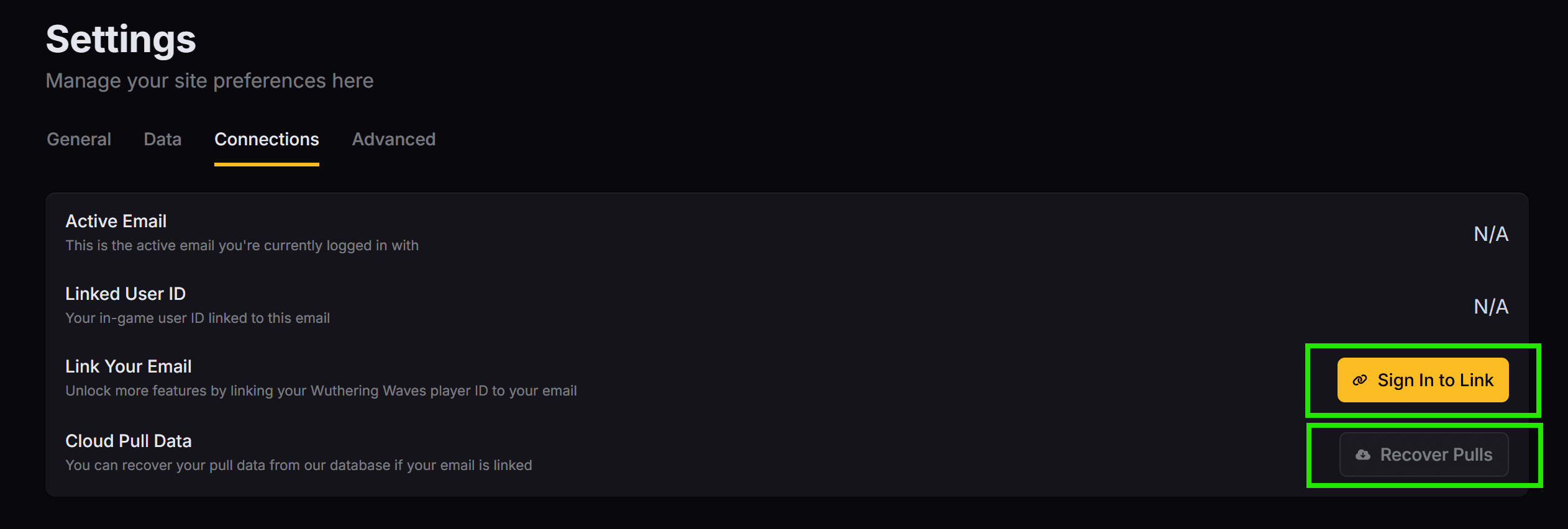
This gives you flexibility and assurance that your pulls are stored in our database for a backup. As long as your email & user ID is linked, you can log in via any OAuth provider (like GitHub & Google) with the linked email, to import your pulls anywhere!
Migrating v3 Pull History Files
For local imports & exports, we still support importing via wuwatracker-pulls files.
First, go to the v3 site settings and click on the download button under the Pull History Data settings to download a wuwatracker-pulls file:

Then finally, simply head over to the v4 site's Data Settings and click the Import Pull History button and upload a v3 pull data file.

Migrating v1-2 Legacy Pulls
If you haven't used our site for over a year, you might have files with the following names;
wuwatracker-data.jsonwuwatracker-pulls.jsonwuwatracker-convene-history.json
You can use the Import Pull History button in your Data Settings to automatically convert them to the latest format!
Here's how the old website with the old formats looks like:


Known Issue: EU & American Pulls Missing Patches 1.0-1.2 Pulls
Ever since WuWa Tracker's inception, we've had 4 major database migrations, across technologies and servers. Unfortunately, the database didn't properly record pulls for EU & American server players for the first couple months of the Global Statistics feature.
Because of this, when some EU & American users of the site will experience the email link not recovering old data (Wuthering Waves patches 1.0-1.2).
This was fixed after it was found out, allowing a small window for people to import to get their data corrected, but unfortunately, not everyone was able to import in time - leading to the aforementioned missing pulls of EU/NA players.
If you were affected by this, there currently isn't a way to manually upload your pulls to our database since our we require pulls to be cross-checked with Kuro's pull data to ensure integrity & prevent Global Staistics abuse.
For those that have local backups of your data, you can still convert your old data to the v3 site and then to the v4 site. Read the previous "Migrating v1-2 Legacy Pulls" section of this article.
How to Migrate Profile Data Files
In WuWa Tracker, there is a distinction between "pull history data" (shortened to "pull data") and "profile data".
Pull data contains, as you'd expect, your pull history data. They are backed up to our cloud database and are heavily monitored for data integrity to maintain our global statistics.
On the other hand, profile data (as of v4.0.10-beta) contains information on other website features like; the Achievements Tracker, Ascension Planner, and the Item Inventory used for the Ascension Planner and is linked to whatever is the currently-selected profile in the settings page (typically your last-imported player ID).
This data is stored locally in your browser and may change from version-to-version due to new feature additions or adjustments.
On the v3 site, this data is automatically backed up via Google Drive synchronization, but that will be retiring in v4 in favor of local import & exports for now.
Eventually, they will be saved together with your pull data on our own servers, so that we can do cooler features with the data and ensure it's properly backed up, managed, and migrated whenever new features arrive.
In the meantime, we're hoping for your patience on the matter and we'll require you to locally manage the data yourself via the Import Profile and Export Profile buttons in the Data Settings. Here's a step-by-step guide on migrating your v3 data to the v4 site:
First, on the v3 site, you need to select the player ID that contains your profile data. Then, you simply press the download button like so:
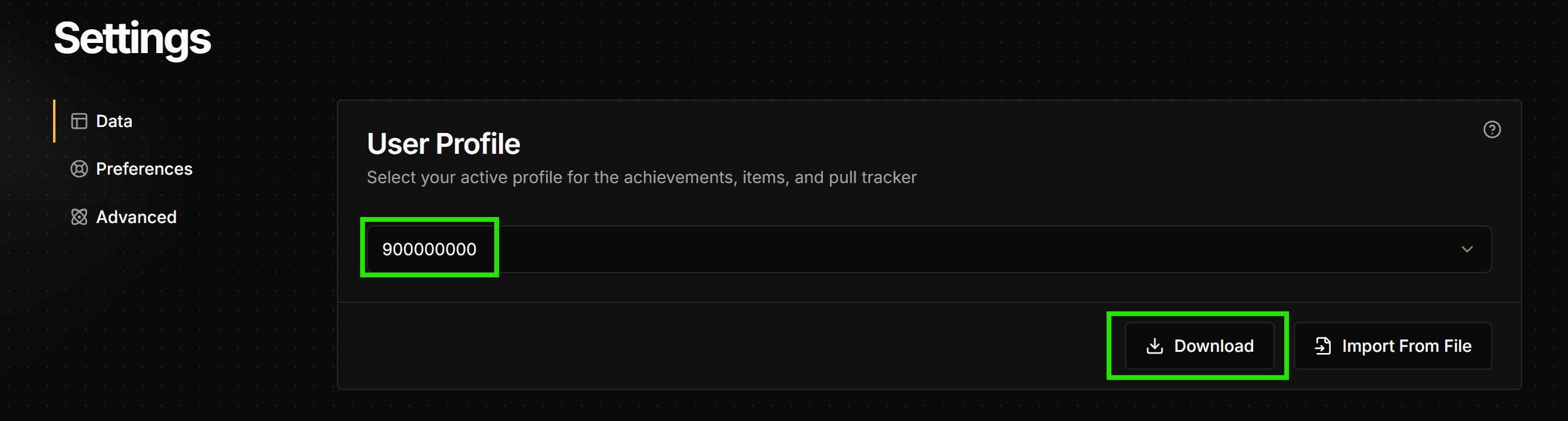
Once you've downloaded your wuwatracker-profile file, head over to the v4 site Data Settings and press the Import Profile button and upload the file.
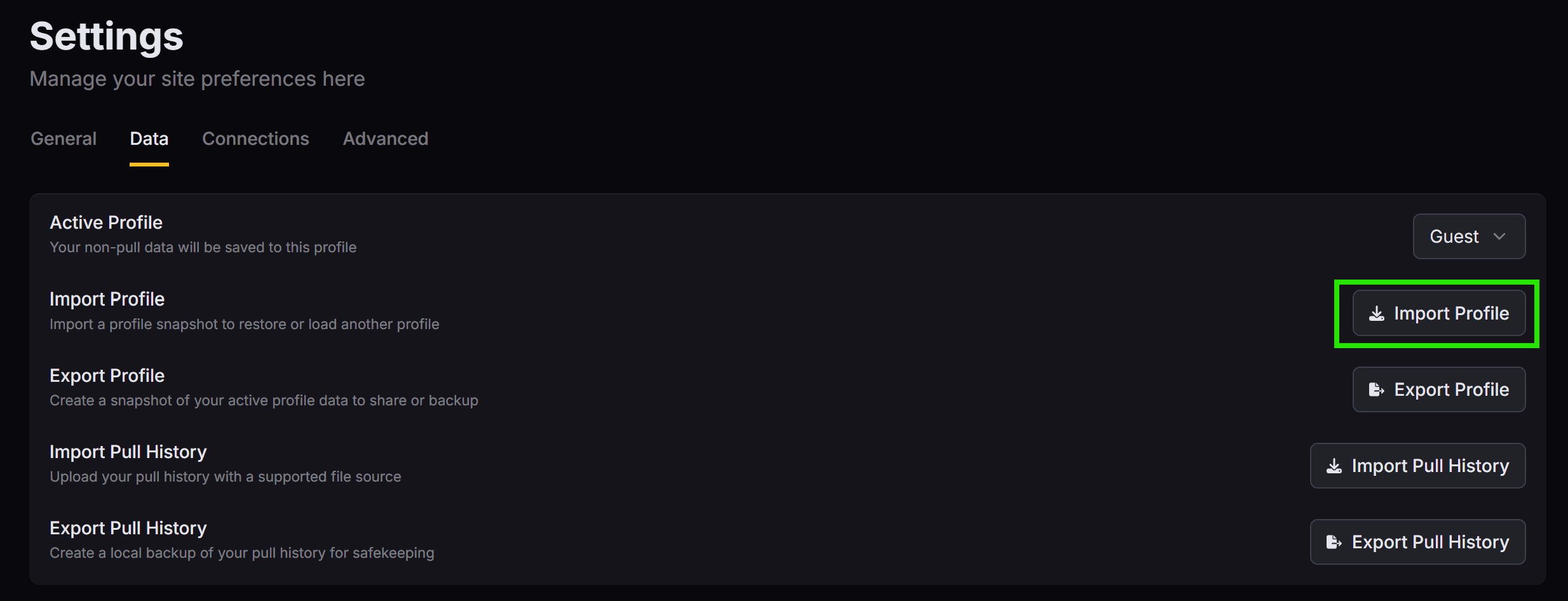
And voilà! You should be able to see all your old data in the new site.
Have questions?
If you have any questions or found the guide confusing, head over to our Discord Server and drop by the 🤷・quick-help channel.
We'd be happy to help and improve the guide based on your experiences!